
Google OAuth2 Authentication#
        sequenceDiagram
    participant App as Your App
    participant Browser as User Browser
    participant Google as Google OAuth2
    App->>Browser: Redirect to Google login URL\nwith client_id + scopes + redirect_uri
    Browser->>Google: User authenticates + grants permission
    Google-->>Browser: Redirect to redirect_uri with auth code
    Browser-->>App: Deliver auth code via callback
    App->>Google: POST token exchange\ncode + client_secret + code_verifier
    Google-->>App: Access Token + ID Token + Refresh Token
    App->>Google: Verify ID Token (verify_oauth2_token)
    Google-->>App: User info (email, name, sub)
Install required packages#
pip install google-auth-oauthlib google-auth
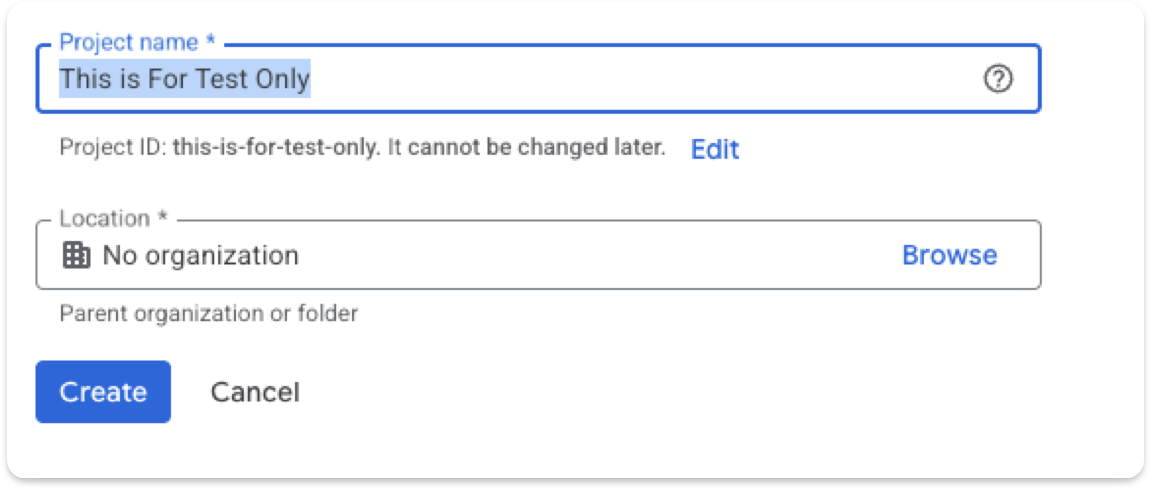
Create a Google OAuth Client#
Click Create Credentials → OAuth client ID
Choose Desktop App
Download the JSON file (e.g.,
client_secret.json)Put the file in your working directory.
Minimal Working Code Using google-auth-oauthlib#
This code:
Opens Google login in your browser
User logs in
Google redirects back to a local server
Code retrieves the tokens
from google_auth_oauthlib.flow import InstalledAppFlow

SCOPES = [
    "openid",
    "https://www.googleapis.com/auth/userinfo.profile",
    "https://www.googleapis.com/auth/userinfo.email",
]

CLIENT_SECRET_FILE = "client_secret.json"

flow = InstalledAppFlow.from_client_secrets_file(
    CLIENT_SECRET_FILE, SCOPES
)

# Run local server — this opens the Google login page
credentials = flow.run_local_server(port=8080)

print("Access Token:", credentials.token)
print("ID Token:", credentials.id_token)
print("Refresh Token:", credentials.refresh_token)
print("User logged in successfully!")
Extract User Info#
from google.oauth2 import id_token
from google.auth.transport import requests

request = requests.Request()

user_info = id_token.verify_oauth2_token(
    credentials.id_token,
    request,
    audience=flow.client_config['client_id']
)

print(user_info)
# {'iss': 'https://accounts.google.com', 'email': 'user@gmail.com', 'name': 'Name', ...}
Implementing the OAuth2 Flow Manually#
To understand how Google OAuth2 works, here is an implementation of the local callback server without the InstalledAppFlow library.
        sequenceDiagram
    participant Script as Python Script\nAuthHttpServer
    participant Browser as Browser
    participant Google as Google OAuth2
    Script->>Script: Generate PKCE code_verifier + code_challenge
    Script->>Browser: webbrowser.open auth_url\nwith code_challenge
    Browser->>Google: User logs in + grants permission
    Google-->>Browser: Redirect to localhost:8765/callback?code=...
    Browser-->>Script: GET /callback delivers auth code
    Script->>Script: threading.Event.set stop server
    Script->>Google: POST token exchange\ncode + code_verifier + client_secret
    Google-->>Script: tokens JSON (access_token, id_token)
import webbrowser
import http.server
import socketserver
import threading
from urllib.parse import urlparse, parse_qs, urlencode
import urllib

import base64
import os
import json
import hashlib

import requests


class Handler(http.server.SimpleHTTPRequestHandler):
    def do_GET(self):
        query = urlparse(self.path).query
        params = parse_qs(query)

        if "code" in params:
            self.server.shared_data['auth_code'] = params["code"][0]
            self.send_response(200)
            self.end_headers()
            self.wfile.write(b"Authorization received. You can close this tab.")
            self.server.event.set()
        else:
            self.send_response(400)
            self.end_headers()
            self.wfile.write(b"No authorization code found.")


class AuthHttpServer(socketserver.TCPServer):
    AUTH_URL = "https://accounts.google.com/o/oauth2/v2/auth"
    TOKEN_URL = "https://oauth2.googleapis.com/token"

    def __init__(self, server_address, client_secret_filepath):
        super().__init__(server_address, Handler)
        with open(client_secret_filepath, "r") as f:
            data = json.load(f)

        self.client_id = data["installed"]["client_id"]
        self.client_secret = data["installed"]["client_secret"]

        self.shared_data = {}
        self.event = threading.Event()
        self.code_verifier, self.code_challenge = self._generate_pkce()

        self._redirect_uri = f"http://{server_address[0]}:{server_address[1]}/callback"

    def _generate_pkce(self):
        code_verifier = base64.urlsafe_b64encode(os.urandom(40)).rstrip(b'=').decode('utf-8')
        code_challenge = base64.urlsafe_b64encode(
            hashlib.sha256(code_verifier.encode('utf-8')).digest()
        ).rstrip(b'=').decode('utf-8')
        return code_verifier, code_challenge

    def start_server(self):
        socketserver.TCPServer.allow_reuse_address = True
        with self as server:
            server.handle_request()

    def auth(self, extract_auth_code=True):
        params = {
            "response_type": "code",
            "client_id": self.client_id,
            "redirect_uri": self._redirect_uri,
            "scope": "openid email profile",
            "code_challenge": self.code_challenge,
            "code_challenge_method": "S256",
            "access_type": "offline",
            "include_granted_scopes": "true",
        }
        auth_url = AuthHttpServer.AUTH_URL + "?" + urllib.parse.urlencode(params)

        webbrowser.open(auth_url, new=1)

        thread = threading.Thread(target=self.start_server)
        thread.start()

        self.event.wait()

        if extract_auth_code:
            return requests.post(AuthHttpServer.TOKEN_URL, data={
                "code": self.shared_data['auth_code'],
                "client_id": self.client_id,
                "code_verifier": self.code_verifier,
                "client_secret": self.client_secret,
                "redirect_uri": self._redirect_uri,
                "grant_type": "authorization_code",
            }).json()

        return self.shared_data['auth_code']


auth_server = AuthHttpServer(("localhost", 8765), client_secret_filepath="client_secret.json")
result = auth_server.auth()
print(result)
Comparison: Library vs Manual Implementation#
Aspect |
Manual ( |
|
|---|---|---|
OAuth flow handled |
Manually build auth URL, start local server, capture code, exchange tokens |
Fully handled by the library |
PKCE handling |
Explicitly generate |
Automatically handled |
HTTP requests |
Use |
Library internally requests token and creates a |
Local server |
Manually run a server with |
|
Summary: InstalledAppFlow saves significant boilerplate. Don’t manually generate PKCE or parse query strings unless you need fine-grained control.